Preferences

Geez for the prices listed in the article (153 EUR and 301 EUR), get a TMM (tiny mini micro - https://www.servethehome.com/introducing-project-tinyminimic...) computer. These are the SFF/USFF off-lease older enterprise computers like Dell Optiplex. Note that ServeTheHome.com does power consumption for every model it reviews.

These ~1L sized computers idle in the 7-13W range. Even with EU electricity prices, it would take you a very, very long time to make up the difference from a 5W SBC.

You also get standard x86 support, normal expand-ability, M.2 slots, PCIe ports, etc. You lose GPIO support.

For $100-$120 on eBay, a search for 'dell optiplex 3070' typically results in getting either a i3-9100 or i5-9500, 8-16GB memory, and 120-256GB NVMe. I bought one a couple months ago for Blue Iris and it uses 8W at idle. Here's an example of a USFF (ultra small form factor) for $110 - https://www.ebay.com/itm/325826958401

Lenovo variant (M720q tiny) for $121 w/ i5-8400T, 16GB, and 256GB SSD (probably NVMe) - https://www.ebay.com/itm/266450621632


I think RPis have pretty much outgrown (outpriced?) their usefulness, except in very specialized applications:

If you want to run a server-task, listen to the common chorus and buy an 3-7 year old SFF business PC. Slap Proxmox on it, and you can virtualize a bunch of small 'servers' as LXCs with plenty of CPU and memory. Easy to add storage, dependable, and well-supported. Power draw is highly overstated for typical ancillary-server tasks, and if you were planning on 2+ Pis, you're now in the same ballpark.

If you want to hack together something with sensors/electronics, use a $5 ESP32, which likely has way more power than you need. If you need more processing power, move that from the edge device to something like the cheap SFF above. Plenty of sample ESP32/8266 Arduino libraries to expose/control the GPIO via a simple API, MQTT, or UDP/TCP payloads. Then, you can write your processing logic in whatever language you want, on a powerful server, and the edge device doesn't need Linux distro updates to blink some LED strips or whatever.

The more I mess with SBCs the more I lean towards this method. The M720q's or M710q's are two of my favorites. As an added bonus the chargers even work with my lenovo laptop(s).

I wish someone made a rack to hold them vertically. I'd own 10 if I could mount them in a rack like this: https://images.prismic.io/macstadium/949d85ad-18be-4059-acf6...
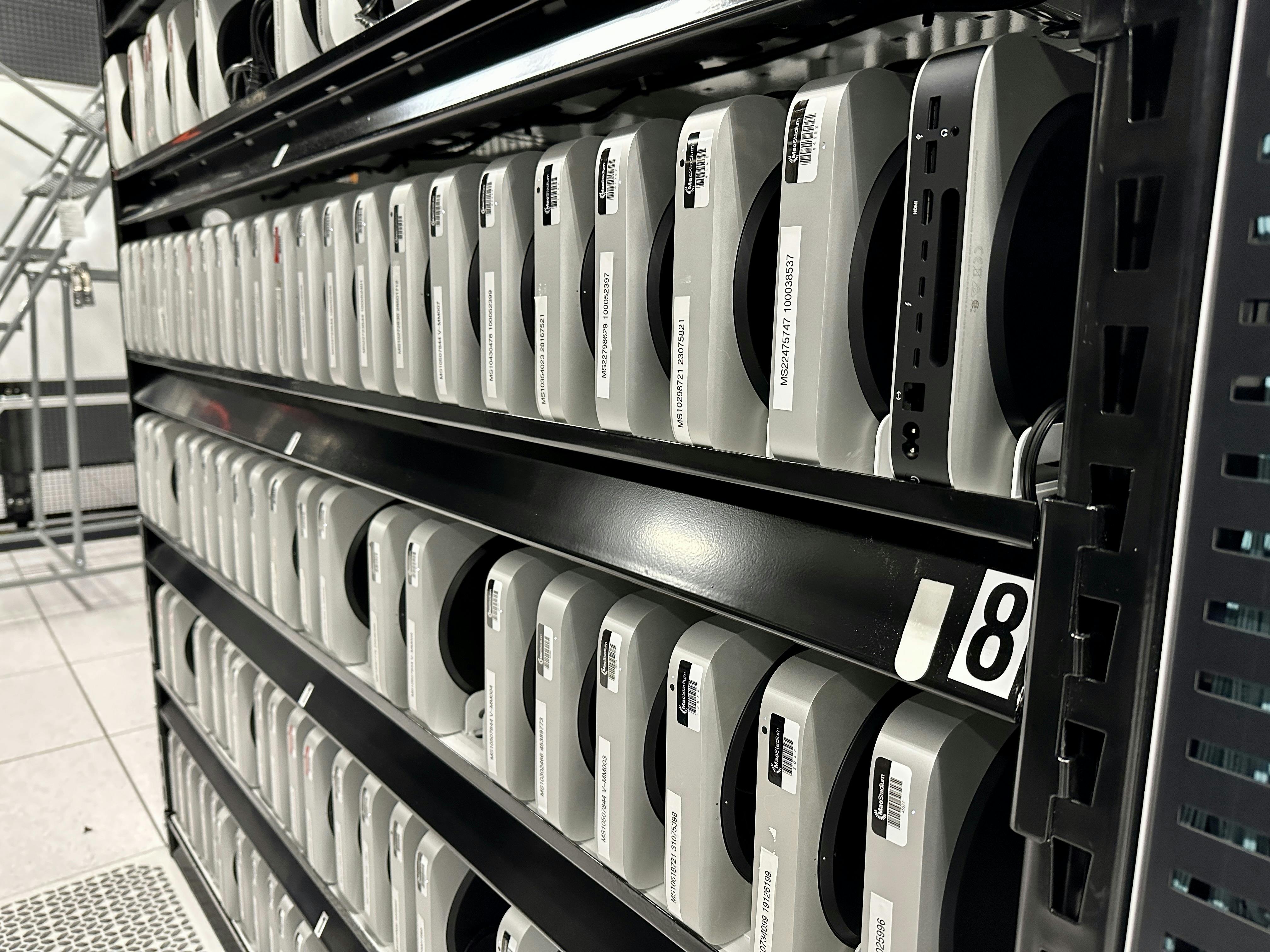
With a 3D printer and a little while in basic CAD your dreams could easily come true.
That’s with no ram or storage, fyi.
This sort of underscores the weakness of RPi as a complete computer:

A complete computer is at least somewhat hardened against ESD and what not, has onboard storage of some description, and isn't severely throttled from a power standpoint.

I like RPis and similar for rapid prototyping if I know I need GPIO control, but if you don't, there are better machines out there, at similar price points.

If you need GPIO you might be able to use a uc like an rp2040 or esp32 and connect that to your dell machine. The uc run as cheap as $5 for something that is 32bits with wifi.
Or less that $1 for a SoC powered by 32-bit RV32IMAFC RISC-V “SiFive E24 Core”.[0]

[0] https://pine64.com/product/pineseed-bl602-wifi-ble5-soc/

That $4 dev board looks like it might be an esp32 killer, or at least good competition. I was thinking of the esp32-c3 which is also risc-v with wifi and ble. It currently has really great rust support. You can even build the stdlib for it so you don't have to mess with no_std. The bl602 doesn't seem to have rust support yet, but I'm looking forward to more options.
> I was thinking of the esp32-c3 which is also risc-v with wifi and ble.

I have a couple of the Pine64 boards that run Linux. Unless something changed, it doesn't have WiFi or BLE support, and likely never will.

> The bl602 doesn't seem to have rust support yet, but I'm looking forward to more options.

I think it does: https://github.com/bouffalolab/bl-pac/tree/main/bl808

Note esp32-c6 is already available. e.g. ESP32-C6-DevKitC-1-N8.
It has rust support.
Does that have any documentation? Or am I looking in the wrong places for it?
Try github[0]. There's a community around this chip, with repos dedicated to collecting the documentation and code the vendor itself wouldn't provide, or would require filling request forms to obtain.

It tends to be like this with Chinese chips, and often times western ones too, unfortunately.

0. https://github.com/search?q=bl602&type=repositories

That's where I've landed for the most part. Last real gasp for dev-board-style SBCs, for me, is when I'm severely space constrained, but can afford to locate a USB hub somewhere else. Then its just simple serial comms with a microcontroller that does the timing-sensitive pin twiddling.
> You also get standard x86 support, normal expand-ability, M.2 slots, PCIe ports, etc.

Let's acknowledge that there are good reasons for avoiding x86 for those who care. The security problems for one, and the long shadow of Microsoft over the ecosystem. Perhaps an additional concern about the supply chain. The closer we can get to an open-source system without blobs, the better.

But the above concerns apart, it seems clear that R.Pi 4 and 400 were peak R.Pi. The performance and low-cost of Intel's recent x86 NUC mainboards is impressive. AMD is also offering strong value in the SFF market.

As I long-time R.Pi/Odroid user, I continue to enjoy these devices. But their lunch has been eaten by competitors.

To be fair, you also need to account for consumption when you make the machine do something. The TDPs for these machines are in the 25-35W range, and hitting 50W does not seem unreasonable. You of course won't be running that the entire time. The larger SFF machines with 65W TDPs will go way above that.

An orange pi 5 uses 7.5W under full load, 3.3W idle in comparison.

If the SFF is doing work, it might be done in a fraction of the time of the pi. Race to finish.

Hard to say without real workloads, but if there are any plans of routinely pegging the CPU, most power efficient strategy is to buy a modern chip.

The orange pi 5 Geekbench score is ~75% of the i5-8500T used as example, so no - the sff won't be done in a fraction of the time. These CPUs are old and crusty after all...

I do agree that modern CPUs are required for high-load situations.

If you agree, than relative measures of TDP/benchmark at the redline are pointless, ignoring that TDP number are often inaccurate anyway.

What you probably want to compare for most home uses is power at some low idle vs performance at that CPU throttle level. The difference is probably a Watt or two max, which never would justify a brand new SBC over repurposing something headed to ewaste for environmental reasons.

Is orange pi 5 as fast as 35W TDP intel CPU ? How many times slower it is than the 65W one ?

Average consumption matters, not peak. And you can pin CPU to not go on higher frequencies if you don't want to go into inefficient max frequency/max voltage region.

You will also be recycling already produced device.

According to Geekbench, an i5-8500T scores ~1100 single core, ~4000 multicore with it's 35W TDP, while the Orange Pi 5 gets ~840 single core and ~2900 multicore. About 75% of the performance at less than 20% of the power. Not too shabby, despite the orange pi being no efficiency star.

Recycling is good, but only to a point. At some point the cost of operation (and resource pressure from its use) will exceed the cost of a more efficient device - at least until we get abundant green power...

Or you can get a brand new N100 mini pc from Amazon for < $150 with 16Gb RAM and a 512Gb SSD (probably cheaper on AliExpress). It's much newer (10nm instead of 13nm+) and can idle as low as 6W.

And for GPIO (if really needed) you can always add something like an USB Arduino micro (clone) for a couple of bucks.

I got one of these recently. It was ridiculously easy to just install stock debs on.

Every time I look at the wall wart plug pack it comes with I laugh to myself. 8W. In terms of price, speed and compatibility the Raspberry Pi looks laughable.

If I want GPIO I just use ESP32s with wifi. I am then unconstrained in terms of other stuff hanging off them. Using the new nano ESP32 boards I can just hot glue them to whatever I want to talk to.

> In terms of price, speed and compatibility the Raspberry Pi looks laughable.

Just for kicks, some reference:

Assuming the Gflops numbers are roughly comparable, ~50 Gflops would have you competing for the #1 spot in the first TOP500 list, June 1993:

https://www.top500.org/lists/top500/1993/06

Which came equipped with 1,024 SuperSPARCs @ 32 MHz:

https://www.top500.org/system/166997

Even ~2000, that might still have squeezed you into the bottom of the list? Note that power consumption of above system will have been in the 10s if not 100s of kW. To say nothing of size or purchase price.

That's only 1 human generation ago. What on Earth are you doing with these things? Running physics simulations of nuclear explosions, or what?

These look really cool. The biggest downside is having 100 brands to choose from. It makes me feel like there's a good chance I could pick something that ends up being total e-waste.

Can anyone recommend one?

I do similar but I look for older laptops.

Gets me integrated: battery, screen, keyboard, mouse

I can buy an old laptop for $100 and would cost me $150 for similar RPI hardware.

I've also compared many 1L PCs from a performance/price/power consumption perspective. I decided on the HP prodesk/ elitedesk 400/800 G5 with the i5-9500T. It idles at ~2-3W and has considerably more computing and storage than these embedded solutions. I only see something like a raspberry pi be handy when relying on GPIO ports.
I don't know what you did to get yours idling that low. My 800 i5-9500t idles at 9w. I took out the flex io module & wifi card, and make sure nvme has "spin down" but still nowhere near that low.

I had some Acer chromeboxes that would do 4.5w easy without any tuning or setup, and they used pretty low end dyal-core i3's from just barely before the i5-9500t. Generally I don't think servethehome finds many tiny mini-pcs below 7w.

I can attest to coffeeri's consumption, albeit on pure server use-case only. I own a OptiPlex 3080 with an i5-10500T and under default BIOS settings (power states and whatnot), I was very surprised to see a 1.7-2.5w power draw on idle, but under typical desktop use, this becomes 6-8w. If this is your draw under a server deployment as well, unfortunately I don't know of any methods to rectify this personally.

When it has to roar however, the draw is substantial compared to my ODroid, but since it idles the majority of the time, I'll take it.

Have you enabled the deep sleep state in the BIOS? It always depends what you are running on it. For me it's very light with only paperless-ngx and a smb share on a nixos. I also only have one RAM stick installed and set up powertop on startup.
If you need various forms of pin I/O (GPIO, SPI, I2C, CAN, etc.), the Beaglebone series kicks the tar out of the RPi series.
To get one in the EU the price triples at least and usually they simply don't ship here.
Not quite the same machine, but the Wyse are plenty fast enough for everything I've needed a home server for. It's quad core and has Intel Quicksync for Plex, and can hold a lot more memory than they state in the official documents.

https://www.ebay.co.uk/itm/256245170577

This listing is UK £75, but I got one for a similar price from the EU.

Good to know, but the UK is not the EU
The Serve The Home articles inspired me to go this route. I want to improve my understanding of Kubernetes for work. I picked up an HP EliteDesk 705 G4 mini desktop and an HP EliteDesk 800 G4 mini desktop. Each was less than $200, and included 16 GB RAM, 256 GB SSD, HDMI and DP outputs, and a power brick. One from Amazon ("renewed") and one from eBay. My 705 came with a Ryzen 2400G, and the 800 came with a i5-8500. I'm not planning to stack them so I was happy with the 65W chips although it means keeping the top of the case clear for cooling. Serve The Home recommends the 35W chips if you are going to stack them.
> Here's an example of a USFF (ultra small form factor) for $110 - https://www.ebay.com/itm/325826958401

Hm...

> No adapter is included. Needs 65W or above (most dell/hp laptops around the year it came out are compatible)

The 65W power adapter on Dell retails for $46.99 on sale, bringing the grand total to $156.99.

And that's just after skimming your link for 2 minutes.

You don't need to buy the OEM power adapter for $46.99

The great thing about these Optiplexes is that they use a standard 20v 4.5x3mm DC jack for power. I run mine off a UPS with a usb-c to barrel jack cable.

No they don't. It is a barrel jack you can obtain an adapter for elsewhere, but your adapter is going to be missing the third pin. This type of system uses the 3rd line to communicate with the power supply and during startup the computer asks it how much power it is capable of supplying. If the power supply doesn't answer, it drastically throttles your CPU. Sure, you can boot the system, though it would be throwing away the majority of your cpu performance.

Furthermore, I have several of these systems and tried sourcing 3rd party power adapters online. For this aspect, not one of them worked correctly.

I did a write up here: https://old.reddit.com/r/homelab/comments/11o0x5o/dell_3050_...

Oh huh maybe I've been running mine in the throttled mode unknowingly, thanks for the pointer.

Edit:

I ran the `cpufreq-info` command in your write-up and it gave me the correct:

> hardware limits: 800 MHz - 3.00 GHz

Maybe it's because the usb-c to barrel jack cable I picked up was marketed for dell laptops?

Lenovo uses a resistor to check the PSU power, should be easy enough. Don't know what Dell is doing.
Looks like a one-wire protocol talking to a DS2501 chip

https://hclxing.wordpress.com/2014/02/09/hacking-a-dell-powe...

The author got almost everything correct except some minor parts. Using his charger as an example, it can be broken down as: DELL 00 AC090 195 046 CN09T2157161543835EAL 03 .

046 is the output current 4.6A instead of his partitioned as 46(there are power supplies output more than 10 amps).

The 22 bytes is the Dell PPID, which should be also present on the charger's label or the box: CN: Manufactured in China, some of them are TH which means made in Thailand. 09T215: Dell Part Number. 71615: Manufacturing factory code. 438: 2004 or 2014, March, 8th (Dell use YMD 3 bytes thus it is a lossy conversion always). 35EAL: This should be the serial number.

The last part 03 is a CRC16 (x16 + x15 + x2 + 1) checksum.

Initial costs are higher with a SFF. Your use case dictates if it is worthwhile.

Last I checked, a Pi also does not come with a charger, case, or storage.

Just shop around a bit.

Ebay Australia has a Lenovo M700 i5 with 8GB RAM, 256 GB SSD for AU$135.00 (US$86) including power supply and cords.

https://www.ebay.com.au/itm/126118210243

My router is an Optiplex fx160. Been running for years. I had to upgrade the storage and add another NIC. Has a built in power supply. I've never managed to run a Pi for this long, even with a decent power supply.
Exactly, we scrap them after like 5 years at the hospital system I work in.
Yep, very standard to upgrade at end of the 5 year warranty period.
Any idea what to similarly search for for a cheap, low power server but has at least 4 bays for hard drives to use as a NAS?
I like zotac silent SFF pcs.

I love the silence, and run proxmox with enough memory and storage.

Are there any that have h265 and avi decoders?
I think you need to look for something 10th gen Intel or up.

I have an HP SFF machine with a 10th gen i3 as my Emby/Plex box and it can transcode 4k streams without breaking a sweat.

The more modern cpu models are a little rare still, but they show up from time to time.

This item has no comments currently.

Keyboard Shortcuts

Story Lists

j
Next story
k
Previous story
Shift+j
Last story
Shift+k
First story
o Enter
Go to story URL
c
Go to comments
u
Go to author

Navigation

Shift+t
Go to top stories
Shift+n
Go to new stories
Shift+b
Go to best stories
Shift+a
Go to Ask HN
Shift+s
Go to Show HN

Miscellaneous

?
Show this modal