That's a common confusion about IntelliJ.
Eclipse Workspace -> IntelliJ Project
Eclipse Project -> IntelliJ Module
In IntelliJ create an empty Project and import all your Maven or Gradle projects as Modules. Everything in one window :)
Edit: Ok, report.
It's... close enough. I don't really like the need to create a new project to contain the "IntelliJ droppings" :) but honestly that's not that different from Eclipse's workspace directories.
Thanks for the tip!
Take a look at this comparison: https://paperstack.com/img/ides/eclipse_vs_idea_problems.png
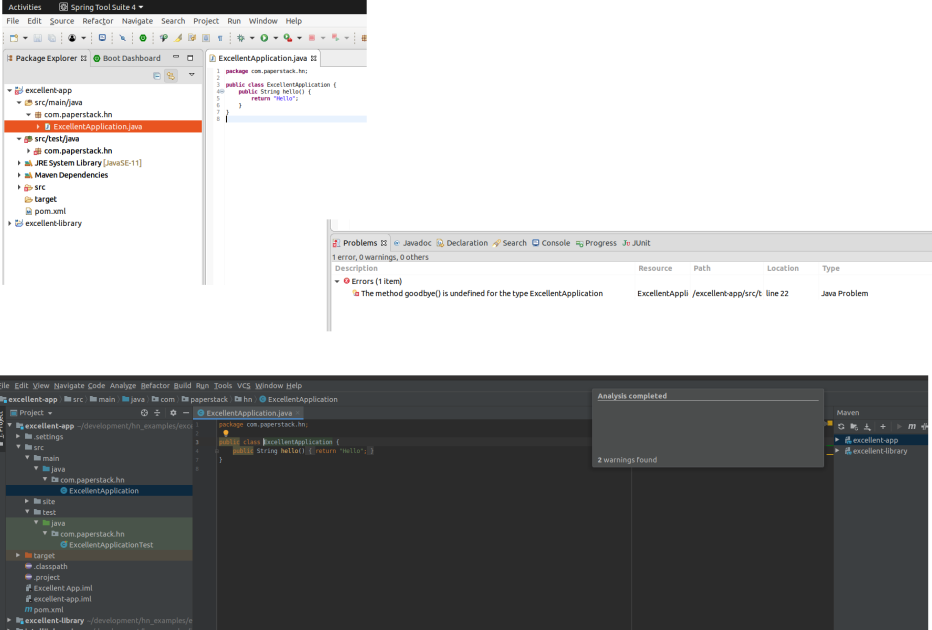
In IntelliJ I can invoke this gizmo for the file I'm in, but it reports the problems for that file. It doesn't tell me where else the problems are. If I do a build I typically get a handful of compilation errors until the build gives up.
In Eclipse, by default, I get the Problems view. It lists all the compilation issues it knows about in the entire project(s).
Because Eclipse does incremental compilation I get to know about issues in a totally different file immediately. I also see stuff like config file errors in the same panel. It's really neat.
IntelliJ may have this feature somewhere, but this doesn't seem to be it.
What do you mean by _running_ specific parts of the code? Isn't this a language problem (compile all dependencies (classes) to byte code, package .class files in jar files, define the main class, define the classpath, and then run)?
Some devs really like this. I never really encounter it as a problem because for any refactoring, I prefer to use IntelliJ's refactoring tools that ensure all code (that's in your project at least) gets rewritten in the same moment the refactoring occurs.
That's the same as Eclipse (e.g. rename method), right? What's the benefit of IntelliJ here?
(Edit: Some of the IntelliJ operations are distinctly superior to the Eclipse ones. But not all. In my experience I'd say they're about even here.)
For example, in Eclipse it's trivial to take an inner class and move it to its own file. In IntelliJ that doesn't seem to be an option.
And that's a breaking change if I do it manually, which is where the Problems panel is so useful.
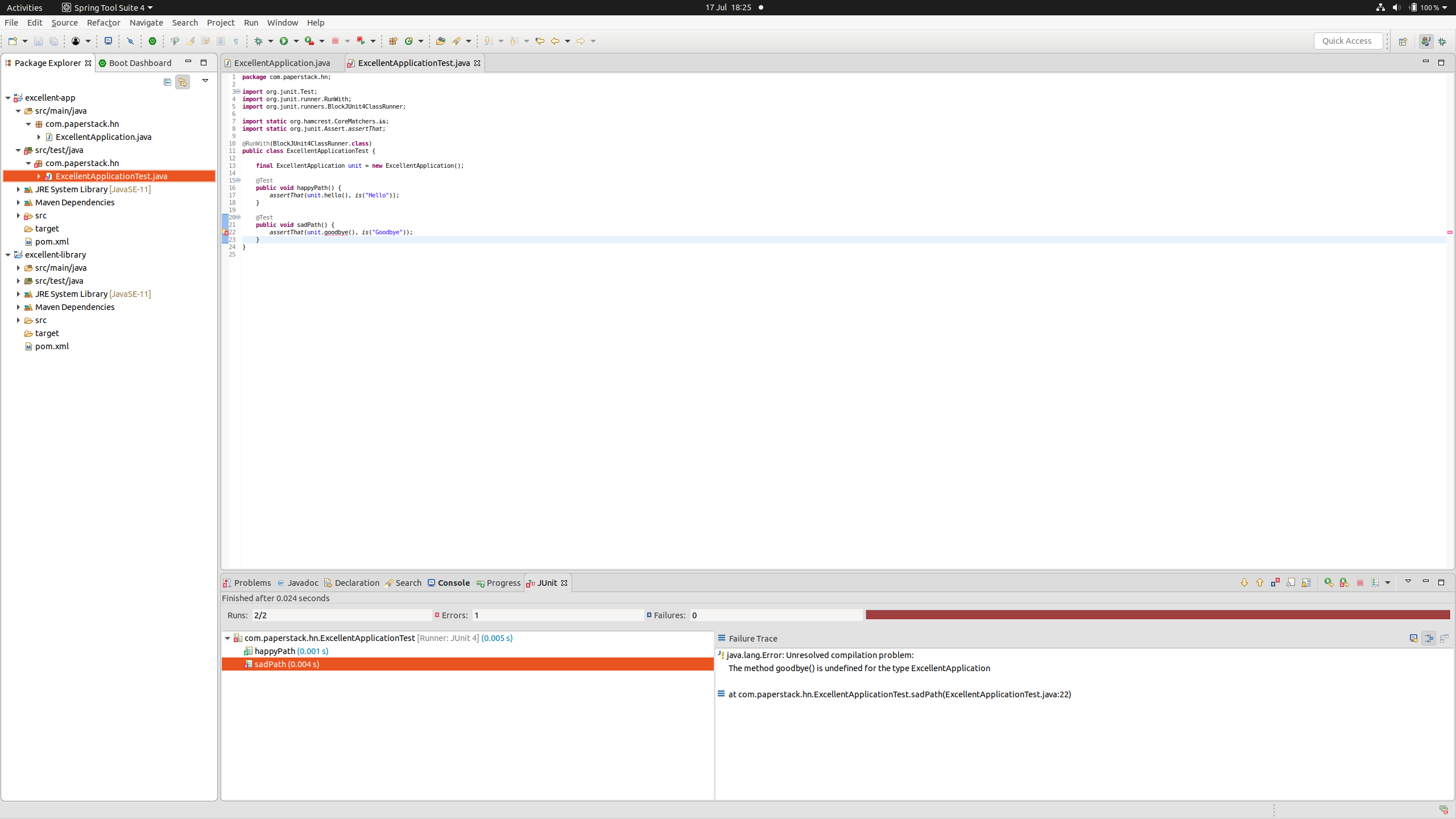
Not forgetting TDD where in Eclipse I can write multiple tests for a feature before any code exists and run them before the unit I'm testing even fully compiles!
For example, in this screenshot one of the methods the test class invokes doesn't exist: https://paperstack.com/img/ides/eclipse_run_broken_code.png
2. For non-static class: Refactor > Move Inner Class to Upper Level
Then you can select class name and parameter name of formerly enclosing class.
Still, when a refactoring operation doesn't exist for a code change (even if it's due to operator ignorance) it's nice to have the Problems pane to tidy up with.
So I was slightly incorrect in that there seems to have been a name change at the same time (as I say, I'm not an Android dev, so I didn't know that).
I was definitely seeing IntelliJ in use, and hearing a lot of praise for it circa 2011 - 2013, so it does look to me like the love for it precedes the Android dev environment switch.
Its suggestions stuff is nice, and it works reasonably well. In particular it supports multiple languages much better than Eclipse's motley range of plugins. So I can see why your list of uses makes it the superior option there.
But for primarily Java development, which is where I encounter it and the most vocal love for it, it lacks a couple of key features (or non-obvious configuration to enable them I guess?)
* You can't run code unless the whole project compiles (poor for quick sanity check, test driven development, and refactoring breaking changes).
* You don't get the "problems" view of compilation issues (and optionally analysis output like findbugs) so as often as not I'll try to run a test, building the whole shebang, when the end result will be needing to fix a trivial syntax error. Eclipse tells me that first.
* It's a pain to use when working with multiple (source independent) projects simultaneously. E.g. a library project and the main project. Eclipse lets you open anything you want to in the same window and presents them in the same explorer view.
It also, anecdotally, feels slower than Eclipse, and seems to enjoy popping up focus-stealing windows more often than Eclipse (though I guess I can cuss Gnome just as much for that one).
I don't hate it, but I do miss Eclipse.
Edit: I should add that it supports Gradle rather better than Eclipse does, but since I really dislike Gradle I'm not sure how much of a plus that is!